From Zero to Inbox: Setting Up Production Email with AWS SES
Configuring domain identities, DKIM, SPF, DMARC, and inbound routing for multiple domains
Summary
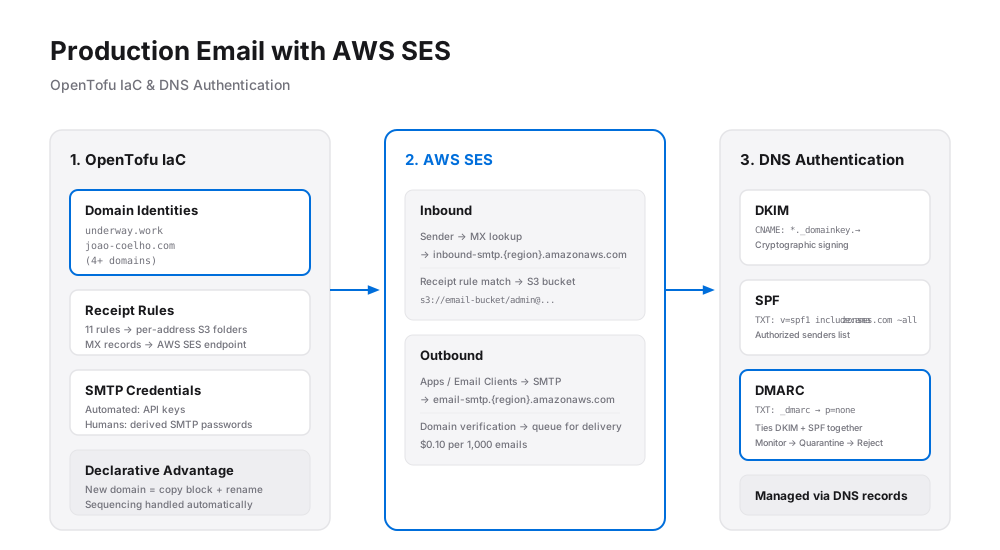
This post (the first of a 3-part series) walks through building a complete email infrastructure for all our personal domains using AWS SES (Simple Email Service), entirely managed through Infrastructure as Code with OpenTofu.
Why AWS SES?
Most hosted email services charge monthly platform fees that grow fast across multiple domains.
AWS SES flips that model: $0.10 per 1,000 emails, no monthly fees, no per-domain surcharges.
The trade-off is that it's raw infrastructure — no polished dashboards, just an API and a pile
of DNS configuration to get right.
Another goal is to learn how to set up this kind of infrastructure from scratch, with the
help of AI.
Going in, I knew it would be harder than it seemed, and to me that meant more learning (although
I almost came to regret it a couple of times 🙂).
How it fits together
Email flows in two directions:
- Inbound: a sender's server looks up the domain's MX record, routes the message to SES, and SES stores it in an S3 bucket
- Outbound: applications or email clients submit mail to SES via SMTP, and SES handles delivery
Every resource (DNS records, domain identities, storage buckets, user credentials) is declared in OpenTofu configuration files rather than clicked through a console.
Making email trustworthy
Modern email relies on three complementary standards that together prove a message is legitimate:
- DKIM (DomainKeys Identified Mail): cryptographically signs each outgoing message so receiving servers can verify it hasn't been tampered with and genuinely came from the claimed domain.
- SPF (Sender Policy Framework): publishes a DNS record declaring which servers are authorized to send on a domain's behalf, making address spoofing much harder.
-
DMARC
(Domain-based Message Authentication, Reporting, and Conformance): ties DKIM and SPF together
with a policy telling receiving servers what to do if authentication fails; starting with
"monitor only" (
p=nonep=noneis a DMARC policy setting.It means:
"Do not reject or quarantine emails that fail DMARC checks; just monitor and report them."
So with p=none, receiving mail servers are told to take no enforcement action if an email fails DMARC. Instead, the domain owner can collect DMARC reports and see whether SPF/DKIM are configured correctly.It's commonly used as a safe first step before moving to stricter policies like:
p=quarantine— send failing mail to spam/junkp=reject— reject failing mail entirely
Receiving email
Each domain gets an MX record pointing at AWS's inbound SMTP endpoint.
Incoming messages are matched against receipt rules and filed into per-address folders in S3 —
so [email protected] lands separately from [email protected].
Eleven receipt rules cover addresses across all four domains (the number of emails I had at the
time I did this project).
All the MX records were done in IaC and created instructions for AI on how to set them up for when new email addresses are added.
Sending email
Two types of senders need credentials: automated systems (scripts, applications) get programmatic API keys, while human users get SMTP credentials to configure in a regular email client. SES SMTP passwords aren't the same as API keys — they're derived from them via a separate conversion step.
The Infrastructure as Code advantage
Because everything is declared in code, adding a fifth domain means copying an existing block, changing the domain name, and running one command. The configuration also enforces ordering: DNS records that depend on values AWS generates (like DKIM tokens) are kept in the same file as the AWS resources, so the tooling handles sequencing automatically.
In reality, this was all done by AI, with oversight by me. Instructions (in MD format) were written so that when new emails or domains are added, the process will be a lot easier.
What's next
Two gaps remain: incoming emails land in storage unscreened (spam is a real concern), and reading raw email files from a bucket isn't a practical day-to-day experience. The next two posts address both: