From Raw JSON to Actionable Insights: Analyzing Load Test Data
How we used Pandas and Plotly to optimize our serverless architecture
In the previous post, we detailed how we used Python and Locust to simulate highly dynamic, massive-scale load tests against our AWS Lambda backend. Our goal was to find the perfect configuration that balanced lightning-fast response times (avoiding Lambda cold starts) with minimal infrastructure costs.
Our Locust workers did their job perfectly, running tests that ranged from 30 seconds to 5 hours. But success in load testing isn't just about generating traffic; it's about what you do with the aftermath. We were left with a massive amount of data: massive JSON files filled with user IDs, endpoints, response times, and status codes, plus a sea of operational metrics sitting in DataDog.
Here is how we built a Python-based data ingestion and visualization pipeline to make sense of it all.
Step 1: Ingestion and Transformation
When you're dealing with hundreds of thousands of simulated users over hours of testing, raw JSON files quickly become too unwieldy for quick analysis.
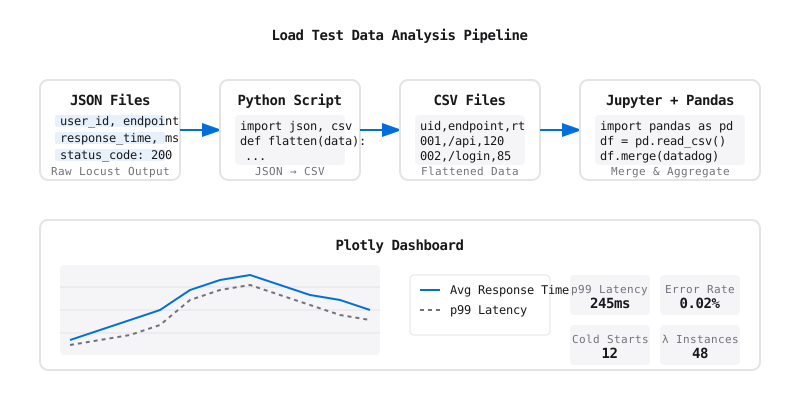
Our first step was building a Python script to process these JSON files and flatten the nested, complex structures into clean CSV files. This intermediate extraction step acted as a cache, making subsequent reads significantly faster and easier to handle.
Next, we brought the CSV data into Jupyter Notebooks using Pandas. If you work with data in Python, Pandas is your best friend. We loaded our CSVs into Pandas DataFrames, which allowed us to easily merge our Locust performance data with the system logs we ingested from DataDog. We could aggregate response times by endpoint, calculate the 95th and 99th percentile latencies, and map those spikes directly against Lambda memory and CPU usage over time.
Step 2: Visualization with Plotly
Data in a table is great, but to convince upper management of infrastructure changes, you need visuals.
We used Plotly to generate our charts within Jupyter Notebooks. If you are familiar with the Python ecosystem, you likely know Matplotlib. Plotly is similar to Matplotlib in that it's a powerful graphing library, but it shines in its interactivity. Because Plotly renders HTML/JS-based graphs, we could hover over data points in our notebooks to see exact timestamps, zoom into specific 1-minute traffic spikes, and isolate individual endpoint performance on the fly.
We created dashboards that mapped our dynamic user load (the shape of the traffic) over a timeline, overlaid with:
- Average and p99 response times.
- Error rates during sudden traffic spikes.
- Cold start frequencies vs. active Lambda instances.
The Outcome: No Surprises
By presenting these rich, data-backed Jupyter reports to upper management, we were able to confidently recommend specific architectural and parameter changes. We tuned our Lambda concurrency and memory settings based exactly on where the data showed the optimal intersection of cost and performance.
The true measure of this project's success? Zero surprises in production. When real-world traffic hit the dynamic peaks we had simulated, the backend scaled exactly as our Plotly charts predicted. By treating our load testing data with the same rigor as a data science project, we achieved a highly available, cost-effective serverless backend.